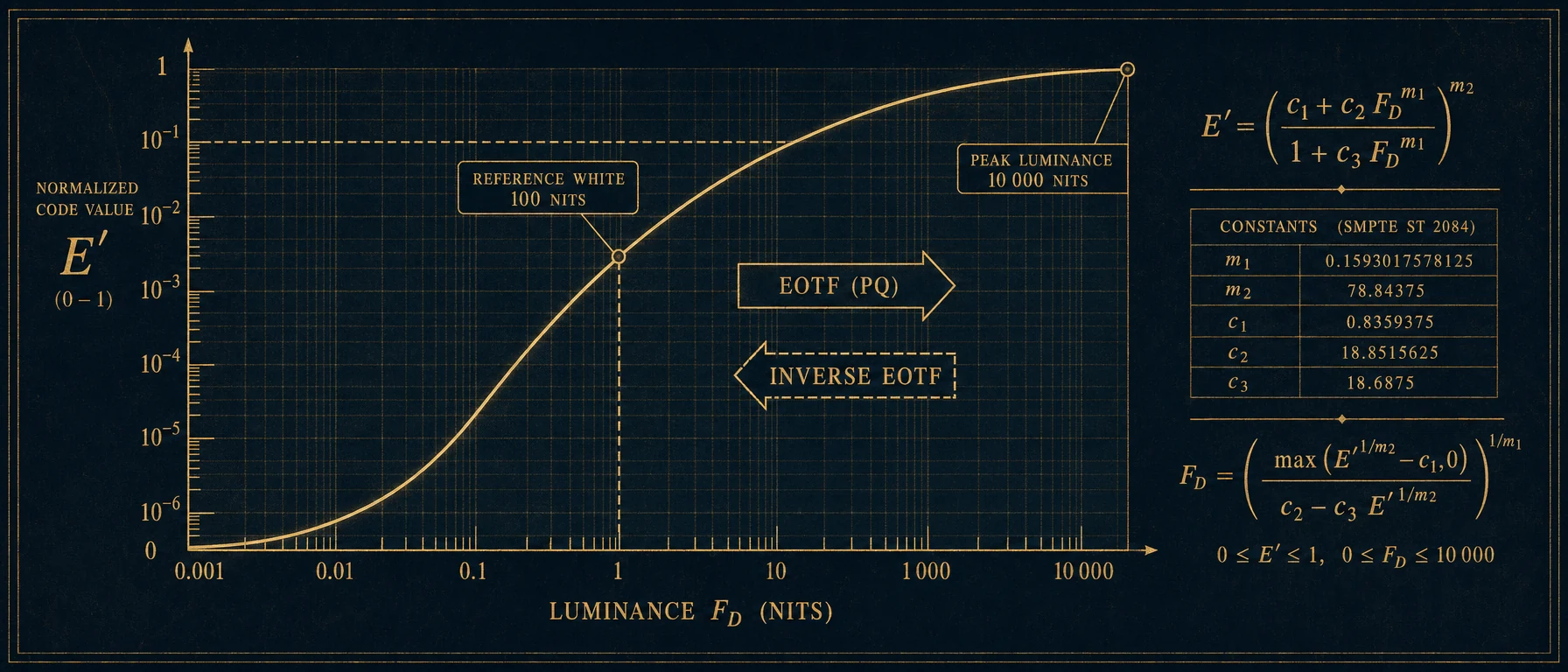
Electro-optical transfer function (EOTF) standardized as SMPTE ST 2084 for HDR video – designed to match human visual perception, enabling efficient encoding of high dynamic range content up to 10,000 nits, used in HDR10, Dolby Vision, and HDR10+ formats.
What is PQ?
PQ (Perceptual Quantizer) is an electro-optical transfer function for HDR video, standardized as SMPTE ST 2084. It enables efficient encoding of brightness up to 10,000 nits.
Basic Principle
| Aspect | Description |
|---|---|
| Type | EOTF (Electro-Optical) |
| Standard | SMPTE ST 2084 |
| Developer | Dolby Laboratories |
| Purpose | HDR Encoding |
Technical Basis
| Parameter | Value |
|---|---|
| Max Luminance | 10,000 nits |
| Min Luminance | 0.0001 nits |
| Bit Depth | 10-bit minimum |
| Perceptual Model | Barten Model |
Barten Model
| Aspect | Description |
|---|---|
| Basis | Human Perception |
| Contrast Sensitivity | Considered |
| Efficiency | Optimal Bit Distribution |
| Science | Psychovisual Research |
PQ vs. Gamma
| Aspect | PQ | Gamma |
|---|---|---|
| Dynamic Range | Very High | Limited |
| Max Luminance | 10,000 nits | ~100 nits |
| Perception | Optimized | Historical |
| Bit Efficiency | Better | Standard |
PQ vs. HLG
| Aspect | PQ | HLG |
|---|---|---|
| Type | Absolute | Scene-Referred |
| Backward Compatible | No | Yes |
| Application | Streaming, Disc | Broadcast |
| Metadata | Often Necessary | Not Necessary |
HDR Formats with PQ
| Format | Description |
|---|---|
| HDR10 | Static PQ |
| HDR10+ | Dynamic PQ |
| Dolby Vision | PQ with Dynamic Metadata |
| PQ10 | Basic PQ |
HDR10
| Aspect | Description |
|---|---|
| Metadata | Static |
| MaxCLL/MaxFALL | In Container |
| Distribution | Very Wide |
| License | Open |
Dolby Vision
| Aspect | Description |
|---|---|
| Metadata | Dynamic, Per Shot |
| Tone Mapping | Precisely Controlled |
| License | Dolby Licensed |
| Quality | Highest |
Workflow Integration
| Phase | PQ Relevance |
|---|---|
| Acquisition | Log Capture |
| Grading | PQ Monitoring |
| Export | PQ Encoding |
| Display | PQ Decoding |
Grading with PQ
| Aspect | Description |
|---|---|
| Monitoring | PQ-Capable Monitor |
| Timeline | PQ or Log |
| Reference | 1000/4000 nits |
| Workflow | ACES or DaVinci |
Display Mapping
| Aspect | Description |
|---|---|
| Problem | Display < Mastered |
| Solution | Tone Mapping |
| Method | Roll-off in Highlights |
| Quality | Varies |
Metadata
| Type | Description |
|---|---|
| Static | MaxCLL, MaxFALL |
| Dynamic | Per-Scene, Per-Frame |
| Container | HEVC SEI, etc. |
| Function | Display Guidance |
MaxCLL / MaxFALL
| Parameter | Meaning |
|---|---|
| MaxCLL | Maximum Content Light Level |
| MaxFALL | Max Frame Average Light Level |
| Usage | Tone Mapping |
| Location | Container Metadata |
Encoding
| Codec | PQ Support |
|---|---|
| HEVC | Yes |
| AV1 | Yes |
| VP9 | Yes |
| ProRes | Yes (4444 XQ) |
Color Spaces with PQ
| Color Space | Combination |
|---|---|
| Rec.2020 | Standard for HDR |
| P3 | Intermediate |
| Rec.709 | Not Common |
| ACES | Workflow |
QC Considerations
| Check | Description |
|---|---|
| Peak Nits | Within Spec |
| FALL | Check Average |
| Clipping | Avoid |
| Metadata | Correct |
Display Requirements
| Spec | Minimum |
|---|---|
| HDR10 | 1000 nits peak |
| Dolby Vision | Certified |
| Consumer | 400-4000 nits |
| Grading | 1000-4000 nits |
Best Practices
| Practice | Reason |
|---|---|
| Calibration | Accurate Representation |
| Reference Monitor | True HDR Feedback |
| Metadata | Set Correctly |
| SDR Check | Test Downconvert |
Today
PQ is the dominant HDR standard for premium content. The combination of a scientific basis, wide adoption, and high quality makes PQ the first choice for HDR mastering. With the increasing prevalence of HDR displays, a correct understanding of PQ is becoming more important for everyone involved in film post-production.
More in the lexikon
Related terms
Camera · Technique
HDR
High Dynamic Range imaging capturing and displaying a wider range of brightness levels.
Camera · Technique
HDR10
Sound · Technique
Dolby Vision
Camera · Technique
HLG
Camera · Technique
Color Space
Defined range of colors a system can capture, display, or reproduce, like Rec.709…
Camera · Technique
Recommendation 2020 / ITU-R BT.2020
Camera · Technique
Academy Color Encoding System
The Academy of Motion Picture Arts and Sciences standardized color encoding system that…
Camera · Technique
DCI-P3