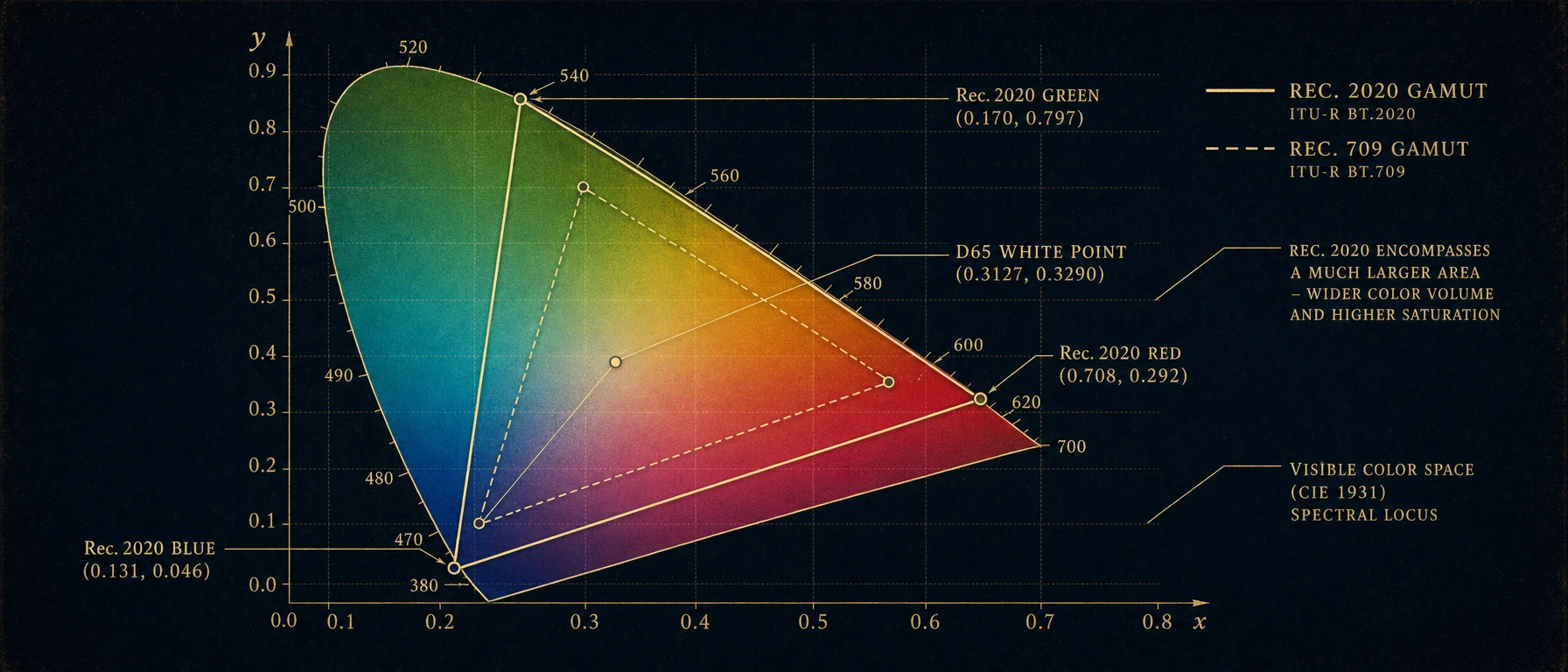
Color space standard for 4K and HDR. Wider color gamut than Rec. 709, supports deeper color gradation (10/12-bit). Essential when shooting HDR to capture the full dynamic range and color information.
Definition
Rec. 2020 (ITU-R BT.2020, also known as "BT.2020" or "Ultra HD Color") is the international standard for high-definition television, particularly Ultra HD (4K/8K), and is closely linked to HDR (High Dynamic Range). The standard defines:
- RGB Primaries: Highly saturated colors for an expanded gamut
- White Point: D65 (like Rec.709)
- Color Depth: 10-bit or 12-bit (vs. 8-bit in Rec.709)
- Dynamic Range: Up to 16+ stops with HDR modes
- Gamut Volume: ~76% of the human color space (vs. 44% in Rec.709)
The standard was adopted in 2014 and is increasingly becoming the standard for streaming and cinema.
Technical Specifications
RGB Primaries and Gamut Expansion
The Rec.2020 primaries in the CIE 1931 xy color space:
| Color | x | y | Difference to Rec.709 |
|---|---|---|---|
| Red (R) | 0.708 | 0.292 | +0.068 / -0.038 |
| Green (G) | 0.170 | 0.797 | -0.120 / +0.197 |
| Blue (B) | 0.131 | 0.046 | -0.019 / -0.014 |
| White Point (D65) | 0.3127 | 0.3290 | (identical) |
Visual Implications:
- Red: Deeper red (primary red)
- Green: Much more saturated, almost neon green
- Blue: Pure, less violet
Gamut Comparison (Volume):
| Standard | Gamut Volume | Application | Color Richness |
|---|---|---|---|
| sRGB | 43% | Web, Consumer | Limited |
| Rec.709 | 44% | HDTV, Broadcast | Limited |
| Adobe RGB | 52% | Photography | Expanded |
| DCI-P3 | 56% | Cinema, Digital Cinema | Very Expanded |
| Rec.2020 | 76% | Ultra HD, HDR | Maximum (practical) |
| Lab Color Space | 100% | Theoretical Maximum | All humanly perceptible colors |
Rec.2020 covers 76% of the entire humanly perceptible color space.
Color Depth and Bit Quantization
Rec.2020 requires higher bit depths for gamut resolution without posterization:
Rec.709 (Standard 8-bit):
256^3 = 16,777,216 colors
Gamut Resolution: 16,777,216 / 0.44 ≈ 38 million per % of gamut
Rec.2020 (10-bit):
1024^3 = 1,073,741,824 colors
Gamut Resolution: 1,073,741,824 / 0.76 ≈ 1.4 billion per % of gamut
Sufficient for all hues without banding
Rec.2020 (12-bit, rare):
4096^3 = 68,719,476,736 colors
Practically unlimited color resolution
Archival and premium post-production
HDR Modes with Rec.2020
PQ (Perceptual Quantizer) - Dolby Vision, HDR10
Characteristics:
- Dynamic Range: 0-10,000 nits (vs. 100 nits in SDR)
- Gamma Curve: Special Perceptual Quantizer curve (not simply 2.4)
- Black Level: Absolute 0 nits (no foot/headroom like in Rec.709)
- Supported Formats: HDR10, Dolby Vision, HDR10+
Practical Consequences:
- Very dark scenes can be absolute black
- Extremely bright highlights (lights, fire, sun)
- Longer grading time for optimal results
HLG (Hybrid Log-Gamma) - Broadcast HDR
Characteristics:
- Backward-compatible: Can be viewed on SDR monitors
- Viewing Condition: Assumes standard room lighting (not completely dark)
- Gamma: Combination of log and gamma for broadcast
- Supported Formats: BBC, EBU, OBS standard
Practical Application:
- Terrestrial Broadcasting (over the air)
- Less common in streaming
- Good fallback for SDR devices
Workflow in DaVinci Resolve for Rec.2020
Project Setup
Project Settings > Color Management
- Input Color Space: Camera Format (Red, Arri, Sony)
 or Rec.2020 (for already converted material)
- Timeline Color Space: DaVinci Wide Gamut RGB (internal 32-bit float)
- Output Color Space: Rec.2020 (for HDR)
- Monitoring LUT: PQ (Dolby Vision) or HLG (Broadcast)
Timeline Configuration for HDR
- Project Settings:
- Resolution: 3840x2160 (4K) or 7680x4320 (8K)
- Color Depth: 32-bit Float (essential for HDR)
- Rec.2020 as Output Space
- Color Management:
- Decoder Color Space: Camera-specific
- Create Dolby Vision or HDR10 metadata
- Monitoring:
- HDR monitor required (e.g., Dolby PRM4200)
- Set to HDR color space in Preview
- Alternative: Rec.709 monitoring with HDR-to-SDR curve
Grading for Rec.2020/HDR
Phase 1: HDR Fundamentals
- Log-to-PQ/HLG conversion automatic
- Check exposure range (0-10,000 nits for PQ)
- Use histogram in HDR mode
Phase 2: Highlight Management
- Brighter-than-white highlights enabled (~3-10 nits)
- Caution: Very bright values cannot be displayed on SDR
- Separate curves for highlights in HDR possible
Phase 3: Color Saturation
- Rec.2020 allows higher saturation
- Colors appear richer, more vibrant
- Caution: Not overly extreme saturation (can look artificial)
Phase 4: Shadow Details
- Absolute black possible (0 nits)
- Preserve details below standard black
- Black crushing not automatically possible
HDR Monitoring Setup
Ideal Hardware:
- Display: Dolby Vision certified monitor (e.g., Dolby PRM4200, Eizo CG3200)
- Colorimeter: For correct calibration
- Room: Controlled lighting (50 lux standard, dark for Dolby Vision)
Software Setup in DaVinci:
- Window > Workspace > Enable HDR Inspector
- Update Dolby Vision metadata
- Set HDR mode for monitoring in Preferences
Streaming Platforms and Rec.2020 Requirements
| Platform | Specification | Requirements |
|---|---|---|
| Netflix | Rec.2020 HDR10, Optional Dolby Vision | Compliance test required |
| Apple TV 4K | Rec.2020 HDR10 or Dolby Vision | Optimized for Dolby Vision |
| Amazon Prime | Rec.2020 HDR10, HLG for Live | Dolby Vision optional |
| YouTube 4K | Rec.2020 HDR10 with VP9 codec | Native 4K HDR support |
| Cinema | DCI-P3 (compatible with Rec.2020) | HDR in cinemas is rare |
Gamut Mapping and Rec.2020 to Rec.709 Conversion
Downgrading to Rec.709 for Backward-Compatibility
Many productions need to deliver both Rec.2020 and Rec.709:
Scenario:
- Create master in Rec.2020 HDR
- Generate Rec.709 SDR version for broadcast
- Both versions must be visually compatible
Process:
- Grade Rec.2020 HDR Master
- Create Rec.709 SDR Grade Separately:
- Compress colors within Rec.709 gamut
- Adjust brightness and contrast for SDR
- Reduce dynamic range to 12 stops
- Comparison Monitoring:
- Check Rec.709 version on SDR monitor
- Check Rec.2020 version on HDR monitor
- Ensure consistency
Automated Gamut Mapping in DaVinci
Curve Node Gamut Mapping:
Node > Gamut Mapping Mode
- Soft Clip: Gentle reduction over/outside gamut
- Hard Clip: Sharp clipping
- Preserve Hue: Attempts to maintain hues
Secondary Correction for Color Shifts:
- Color Range Isolation on saturated colors
- Saturation and Hue fine-tuning
- Luminance-based selective grading
10-bit vs. 8-bit and Posterization
Banding Artifacts in 8-bit vs. 10-bit
Scenario: Blue Sky Gradient
8-bit (Rec.709):
Only 256 blue variations available
Visible banding in large areas
10-bit (Rec.2020):
1024 blue variations available
Clean, continuous gradients
Practical Implication:
- 10-bit is the minimum for Rec.2020
- Posterization is a major issue with incorrect configuration
- Always export 10-bit for archiving
Common Errors and Solutions
| Error | Cause | Solution |
|---|---|---|
| Colors too dark on SDR | Rec.2020 on Rec.709 monitor | Use monitoring LUT or grade an SDR version |
| Banding in gradients | 8-bit color depth | Configure project to 10-bit |
| Overly saturated colors | Exaggeration in HDR space | Reduce saturation, check Rec.709 reference |
| Clipping during export | Incorrect output specification | Set HDR10 profile correctly in export |
| HDR monitor shows no difference | Monitor not calibrated | Use a monitor with Dolby Vision calibration |
Practical Scenarios
Scenario 1: Netflix 4K HDR Delivery
Production for Netflix with 4K and HDR:
- Project in Rec.2020 HDR10 in DaVinci
- Grading with HDR monitor
- Rec.2020 HDR10 with Dolby Vision optional
- Compliance test on Netflix servers
- Export with Netflix specs
Scenario 2: Cinema + Streaming Hybrid Distribution
Simultaneous distribution for cinema (DCI) and streaming (Rec.2020 HDR):
- Grade master in DCI-P3 (cinema standard)
- Convert DCI to Rec.2020 HDR
- Perform grading adjustments for HDR
- Cinema: Produce DCI-P3 view
- Streaming: Deliver Rec.2020 HDR
Scenario 3: Documentary with Limited HDR Equipment
Production without access to HDR monitors:
- Grade in Rec.709 (SDR)
- With grading notes for HDR adjustments
- Later, with a professional colorist: Upscale SDR to HDR grade
- Or: Perform separate Rec.2020 HDR grade using a Rec.709 monitor
Calibration and Monitoring for Rec.2020/HDR
Monitor Requirements
Necessary for professional HDR grading:
- Resolution: Minimum 4K for 4K content
- Brightness: 1000+ nits for PQ HDR
- Color Gamut: DCI-P3 or larger
- Certification: Dolby Vision or HDR10
Examples:
- Dolby PRM4200 (4K HDR)
- Sony BVM-HX310 (HDR, very expensive)
- Eizo CG3200 (limited, but calibratable)
Calibration Process
- Room Darkness: Ideally < 5 lux for PQ grading
- Monitor Warm-up Phase: 30 minutes minimum
- Colorimeter Calibration: According to manufacturer's specifications
- Dolby Vision Profile: Load onto the monitor
- Test Patterns: Check gradation and color accuracy
Summary
Rec.2020 is the standard for future productions and premium distribution. The expanded color gamut, higher bit depth, and HDR support offer creative possibilities but also require careful calibration and professional grading techniques. Investment in the right hardware and workflow is essential for professional results.
News
Rec. 2020 is now the standard for HDR workflows, with the combination with the ST.2084 (PQ) transfer function becoming the de facto standard. In DaVinci Resolve and other grading tools, conversion between Rec. 2020 HDR and Rec. 709 SDR is now standard practice. Many filmmakers are already working natively in Rec. 2020, even if the final delivery is in SDR.