Technical Foundations
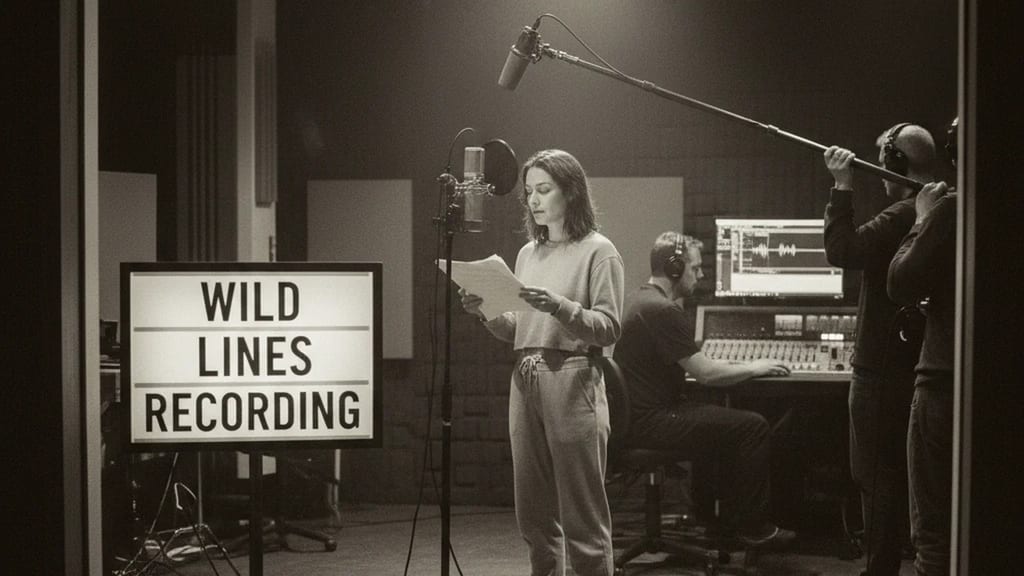
Wild Lines (also called "wild tracks") are dialogue recordings captured during or after principal photography without a camera running. Unlike ADR (Automatic Dialogue Replacement), where the actor returns to the studio weeks later for lip-sync dubbing, wild line recording occurs on the same set, often under identical acoustic conditions.
When are wild lines recorded?
- During shoot breaks (e.g., between takes or between scenes)
- The actor is still "warm" and present
- The voice sounds identical to the principal recording
- Set is quiet enough for audio capture
- Time investment: 5-15 minutes per 2-3 dialogue lines
- After shoot wrap (if problems are identified)
- Sound mixer notices: "This line had wind noise, can we take it again?"
- Actor is briefly brought back
- Official "wild line session" on set
- After complete scene wrap (backup for critical lines)
- Final safety recordings of important dialogue
- Insurance against later ADR necessity
Technical Requirements for Wild Lines
Unlike a normal shooting recording, wild lines operate under slightly relaxed standards:
| Aspect | Normal Shoot Recording | Wild Line Recording |
|---|
| Boom Position | Very precise (20-40 cm) | Standard (25-35 cm) |
| Room Reflection | Minimized | Acceptable (will be matched) |
| Background Silence | Essential | Important, but less critical |
| Level Control | -8 to -6 dB Peak | -10 to -6 dB Peak |
| Recording Duration | Complete scene | 1-3 repetitions per line |
| Cable Setup | Full Professional | Simplified (boom + recorder) |
Level Standards for Wild Line Recordings
- Average Level: -12 to -10 dBFS
- Peak Level: -6 to -4 dBFS
- Signal-to-Noise Ratio: 45+ dB (acceptable, as backup only)
- Frequency Response: Natural, minimally processed
Wild lines can have slightly higher noise floor than original takes, since they don't need to be "legally perfect" – they are backup/supplementary material.
Practical Workflow: Recording Wild Lines
Step 1: Problem Identification During Principal Recording
The sound mixer monitors on headphones during the take:
- "Airplane noise in line 3" → Make note
- "Wind sound on the word 'continues'" → Make note
- "Dialogue was great, but windscreen was positioned wrong" → Make note
After the take, the sound mixer informs the director: "This line has problems, can we record a wild line?"
Step 2: Set Preparation for Wild Line
- Camera is rolled away (not needed)
- Boom operator remains with microphone ready
- Sound mixer with headphones and recorder/mixing console
- Actor is brought to wild line position (can be anywhere on set, doesn't need to match camera position exactly)
- Director or 1st AD calls out the line: "Line 1: 'I'll stop by later' – in 3, 2, 1, go"
Step 3: Perform Recording
Typical wild line setup:
- Actor speaks the line 1-3 times consecutively
- Boom operator holds microphone at standard position (25-30 cm above mouth)
- Sound mixer monitors levels and sound quality
- No stopwatch, no timer – just natural speech
Example sequence:
Director: "Wild lines for line 3, setup ready?"
Sound Mixer: "I'm ready, boom op?"
Boom Op: "Ready"
Director: "Lights?", Grip: "Okay"
Director: "Action for wild line..."
Actor: "I'll stop by later."
Sound Mixer: "Good, good. Again?"
Actor: "I'll stop by later." [2nd repetition]
Sound Mixer: "Perfect. That's it."
Time investment: 2-3 minutes per line.
Step 4: Documentation
The sound mixer or 1st AD documents:
- Scene number and line: e.g., "Scene 45, Line 3 (Dialogue: 'I'll stop by later')"
- Timecode / Recording number: e.g., "WildLine_SC45_L03_Take1"
- Notes: e.g., "Original had airplane noise, wild line clean"
Common Issues and Solutions with Wild Lines
| Issue | Symptom | Cause | Solution |
|---|
| Voice quality differs | Wild line sounds higher or duller | Different mic position or actor energy changed | Remind actor of scene/context, adjust mic position |
| Excessive background noise | Wild line sounds noisy | Set became louder (crew talking, fans running) | Politely request silence, or move to quieter location |
| Actor "indicates" instead of performing | Wild line sounds unnatural, monotone | Actor lacks context | Briefly explain context ("You're angry, say the line aggressively") |
| Too much reverb/reflection | Wild line sounds "choppy" | Recording at different location with different room tone | Perform room tone matching later in mixing |
| Spoken too fast or too slow | Timing doesn't match mouth movement | Pressure to finish quickly | Give actor time, remind of tempo |
Wild Lines vs. ADR: When to Use What?
| Aspect | Wild Line | ADR |
|---|
| Timing | During/after shoot | Weeks/months later |
| Set Conditions | Identical to original | Studio environment (isolation) |
| Sound Match | Very good (identical room acoustics) | Difficult (different room acoustics) |
| Cost | Cheap (10-15 min shoot time) | Expensive (200-500€ ADR session) |
| Post-Production Effort | Minimal (simple splicing) | High (sync, timing, sound matching) |
| Best Use Case | Individual problematic lines | Re-sync entire scenes |
| Quality | Very high | Medium to high (depends on actor) |
Best Practice: Wild Line Strategy
Proactive Wild Line Capture
Experienced sound mixers do the following:
- After each scene: Record brief wild lines of the 2-3 most important dialogue lines (5 minutes extra)
- Documentation: Catalog all wild lines with scene numbers
- Categorization:
- Critical: Main dialogue (character development, plot)
- Normal: Secondary text
- Optional: Ad-libs or filler lines
Wild Line Recording Checklist
- [ ] Problem lines identified (sound mixer has notes)
- [ ] Director and 1st AD approve wild line session
- [ ] Actor is still available (not dismissed)
- [ ] Boom operator with microphone and shock mount ready
- [ ] Sound mixer with headphones and recorder
- [ ] Line recorded 1-3 times
- [ ] Levels and sound quality verified
- [ ] Take numbers documented (WildLine_SC#_L#_Take1)
- [ ] All audio saved as separate files
Editing and Integration of Wild Lines
In Post-Production (Sound Editing)
The sound mixer receives the wild line files and integrates them:
- Waveform Matching:
- Place original recording and wild line side-by-side on timeline
- Verify that volume and timing are similar
- A/B Listening:
- Listen to original ("Has airplane noise")
- Listen to wild line ("Clean, but voice sounds slightly different")
- Decision: Use wild line or edit?
- Sound Matching (if necessary):
- Apply EQ and compression to bring wild line closer to original
- Match room tone character
- Splicing:
- Cut out problematic section (e.g., airplane noise from 0:15-0:18)
- Insert wild line section
- Apply 10-20 ms crossfade to avoid clicks
Problematic Wild Line Integration
If a wild line doesn't perfectly fit despite efforts:
- Plan B: Hybrid Approach → 80% wild line, 20% original (use clean parts)
- Plan C: Light ADR → Actor comes for brief ADR session to resolve problem
- Plan D: Audio Repair → Use iZotope RX or similar tools to remove background noise
Documentation and Cataloging
Wild Line Log (Standard Template)
Date: 05/01/2024
Film: "The Dream"
Scene: 45
Line: 3
Original Dialogue: "I'll stop by later"
Actor: Anna Schmidt
Problem (Original): Airplane noise 0:15-0:18
Wild Line Take: WildLine_SC45_L3_Take1.wav
Sound Mixer: Max Müller
Boom Op: Julia Hoffmann
Level: -8 dB Peak
Notes: "Clean wild line, identical voice character"
Usage Status: ✓ USED (integrated into scene)
Summary
Wild lines are an intelligent, cost-effective strategy for improving raw sound quality. Unlike ADR, which occurs much later, wild lines are recorded directly on set while conditions are still optimal.
Advantages:
- Actor is still present and energetic
- Identical room acoustics and voice quality
- Quick and inexpensive (5-10 minutes per line)
- High integration success rate in post-production
Best Practice:
An experienced sound mixer should record brief wild lines of the most important dialogue after each shoot scene. This is a 5-minute investment per scene that can save 2-3 hours of post-production work and 200-500€ in ADR costs later.
Wild lines are not an "emergency plan," but standard practice in professional productions.