Director
Node-basiertes Grading ermoeglicht parallele Looks ohne Neustart. Der Colorist experimentiert schneller, was weniger Wartezeit und besseres kreatives Feedback bedeutet.
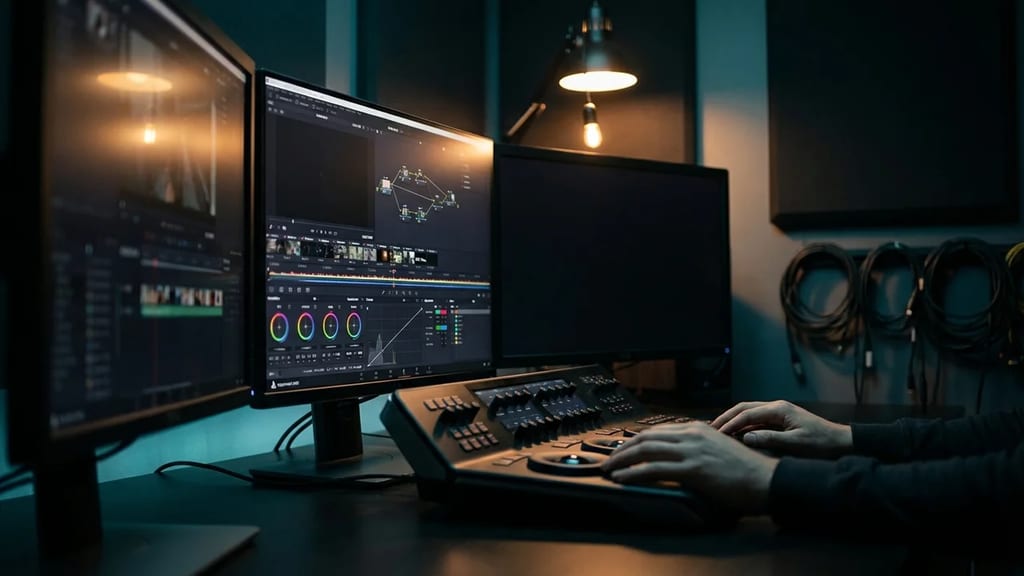
Non-destructive color correction workflow using interconnected node graphs for complex grading, visual effects integration, and modular color pipeline design.
Node-based color grading is a non-destructive color correction workflow based on networks of interconnected nodes. Each node performs a specific task (e.g., color correction, masking, transformation) and passes its result to the next node. This enables complex, modular, and reusable color pipelines.
Unlike traditional page-based interfaces (Lumetri, Legacy Resolve Color Page), which rely on sequential controls, the node graph system visualizes the entire workflow as a diagram:
[Input] → [Pre-Transform] → [Primary Correction] → [Secondary 1] → [Output]
 ↓
 [Power Window Node]
 ↓
(Masking)1. Input/Output Nodes
2. Color Correction Nodes
3. Transformation Nodes
4. Effect Nodes
5. Control Nodes
Standard Professional Node Tree (Minimal)
MediaIn (Timeline Import)
 ↓
ColorSpace (Log→Linear Input Transform)
 ↓
ColorCorrector (Primary LGG)
 ↓
Qualifier → Power Window (Selective Secondary)
 ↓
Curves (Fine-Tuning)
 ↓
ColorSpace (Linear→Output Transform Rec.709)
 ↓
MediaOut (Export)
Complex Multi-Branch Grade
 ┌─ Primary CC Node
 │ ↓
MediaIn ─→ ColorSpace ─┼─ Secondary 1 (Skin)
 │ ↓
 ├─ Secondary 2 (Sky)
 │ ↓
 ├─ LUT Node (Look)
 │ ↓
 └─ Grain/Vignette
 ↓
 Merge (3 Inputs)
 ↓
 Output Transform
 ↓
MediaOutNodes can directly link parameters – this allows for dynamic adjustments:
// Example: Secondary node is controlled by qualifier mask

Qualifier Node
 └─ Red Channel Output → ColorCorrector Alpha Input
 └─ Qualifier selects red pixels
└─ ColorCorrector is applied only to these pixelsA node tree, once created, can be applied to hundreds of clips:
# DaVinci Resolve Scripting Example
project = resolve.GetProjectManager().GetCurrentProject()
timeline = project.GetCurrentTimeline()
clips = timeline.GetClips()

for clip in clips:
 # Apply saved Fusion composition to each clip
 clip.AddFusionComp()
 # Load Node Graph from template
clip.GetFusionComp().SetNodeGraphString(saved_graph)DaVinci Edit Page + Fusion Integration:
DaVinci Color Page (Primary Correction)
 ↓
 Picture Lock
 ↓
Fusion (Secondary Correction, Compositing)
 ↓
 [Create 3 Output Nodes for 3 Deliverables]
 ├─ Rec.709 Node → ProRes 422 Master
 ├─ DCI-P3 Node → DCP-Master
 ├─ Rec.2020 HDR Node → Master File
 ↓
DeliverNaming Convention:
01_PreTx_LogC3toLinear
02_Primary_LGG
03_Secondary_SkinTone
04_Look_FilmEmulation
05_Output_Rec709Fusion allows notes on nodes:
// This node protects skin tones during shadow lift
// Qualifier: Hue 0-60°, Saturation 30-100, Luminance 20-80
// Prevents orange shift in faces during night interior scenesSave frequently used patterns as templates:
These can be applied in seconds via Paste-Node-Graph.
Certain nodes are GPU-optimized:
Complex nodes like DeltaKeyer use more CPU – place these at the end of the tree for better real-time performance.
Challenge: 3 cameras (different angles, exposures)
Solution Node Graph:
Camera A MediaIn ──→ ColorSpace → Primary CC → Output
Camera B MediaIn ──→ ColorSpace → Primary CC → Merge → MediaOut
Camera C MediaIn ──→ ColorSpace → Primary CC ↗
Grade all 3 cameras with identical node trees for automatic matching.
Challenge: Match CGI rendering with live-action plate
Solution Node Graph:
Live-Action Plate
 ↓
 Primary CC
 ↓
 [Save Node Graph as "VFX-Base"]
 ↓
 VFX Artist loads in Nuke:
 - Applies identical node grade to CGI render
- Result: Perfect color matching without color deviationsChallenge: Same grade in Rec.709 (TV), DCI-P3 (Cinema), Rec.2020 HDR (Netflix)
Solution Node Graph with 3 Output Branches:
Master Grade Nodes (all identical)
 ├─ Output Transform Rec.709 → ProRes 422
 ├─ Output Transform DCI-P3 → DCP
 └─ Output Transform Rec.2020 HDR → H.265 Master
One render, 3 different formats – achieved through pure output node adjustment.
| Aspect | Color Page | Fusion Nodes |
|---|---|---|
| Learning Curve | Easy (1-2 weeks) | Medium (4-8 weeks) |
| Real-time Performance | Very fast | Slower with complexity |
| Flexibility | Limited | Maximum |
| VFX Integration | Not possible | Native Fusion Integration |
| Batch Processing | Limited | Fully automatable |
| For Beginners | Recommended | After initial experience |
| For Professionals | Rough Pass | Final/Complex Grades |
Symptom: Performance collapses, timeline lags
Solution: Consolidate similar nodes (e.g., 5 Curves nodes → 1 Master Curves node)
Symptom: Node spaghetti, untraceable
Solution: Use viewer nodes between sections for validation
Symptom: Grade is graded, but rendering shows original
Solution: Always have a MediaOut node at the end + check node connections
Symptom: Grade looks different in Resolve than in the final master
Solution: Visualize output transform with monitor emulation
Node-basiertes Grading ermoeglicht parallele Looks ohne Neustart. Der Colorist experimentiert schneller, was weniger Wartezeit und besseres kreatives Feedback bedeutet.
Node-basierte Workflows ermoeglichen komplexe Composits mit gestapelten Videoclips und Effekten. Die Lernkurve ist steil, aber fuer komplexe Projekte mit vielen Ebenen lohnt sich der Aufwand. Jede Korrektur wird als separater Node organisiert.
Node-Workflows sparen 10-15% Grading-Zeit durch Batch-Processing. Bei Serien mit 10+ Episoden ist ein wiederverwendbarer Node-Tree sehr wertvoll.
1. Was beschreibt „Node-basiertes Color Grading" am besten?
2. Zu welchem Department gehört „Node-basiertes Color Grading"?
3. Wie viele verschiedene Fachperspektiven bietet dieser Eintrag?
The Lexikon is part of the Filmfarm ecosystem — alongside budgeting (FilmBalance), an industry magazine (FilmCircus) and crew networking (FilmCall, CrewMesh). One shared vocabulary for the whole production.