Cinematographer
Das Farbrad ist essentiell fuer schnelle White-Balance-Korrektionen auf Set. Mit modernen Set-Monitoren kann ich Farbverschiebungen korrigieren.
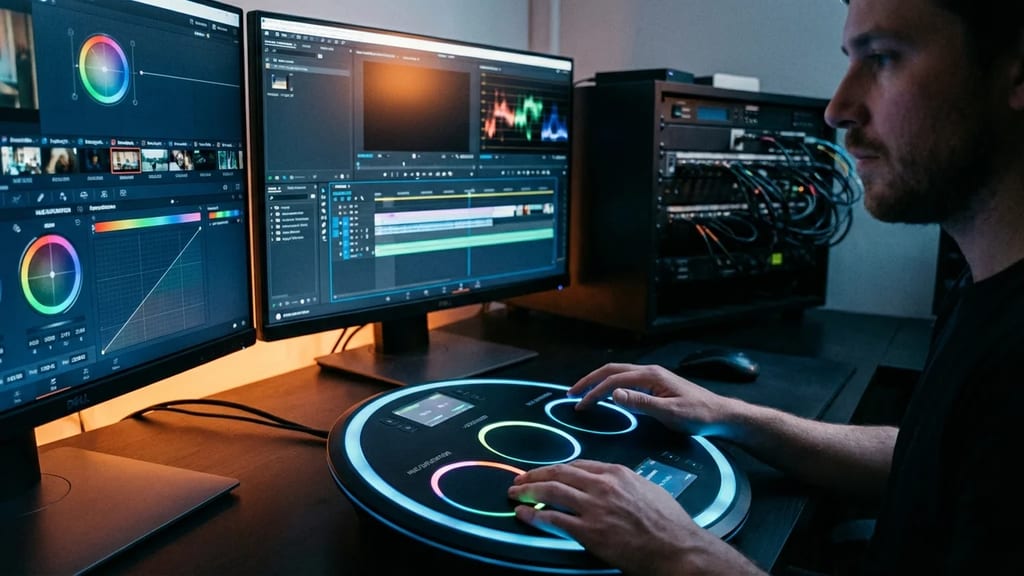
Circular color-correction control: hue is the angle, saturation the radius. Found in DaVinci Resolve and Baselight as the primary tool for lift, gamma and gain.
The Color Wheel is a method in modern color correction and grading software. It provides an intuitive, circular control interface where:
The color wheel enables simultaneous adjustment of hue and saturation in a visual interface, allowing more intuitive work than separate RGB sliders.
The color wheel concept stems from analog television production:
DaVinci Resolve (since v12):
Adobe Premiere/AE (Lumetri):
Final Cut Pro:
The color wheel is based on HSL or HSV color space:
HSL (Hue, Saturation, Lightness)
- Hue: 0-360 degrees (angle)
- Saturation: 0-100% (radius)
- Lightness: 0-100% (separate dimension)
RGB to HSL Conversion:
Max = max(R, G, B)
Min = min(R, G, B)
L = (Max + Min) / 2

S = 0 (if L = 0 or 1)
S = (Max - Min) / (2 - Max - Min) (if L > 0.5)
S = (Max - Min) / (Max + Min) (if L ≤ 0.5)

H = 0 (if Max = Min)
H = 60 * ((G - B) / (Max - Min)) + 0 (if Max = R)
H = 60 * ((B - R) / (Max - Min)) + 120 (if Max = G)
H = 60 * ((R - G) / (Max - Min)) + 240 (if Max = B)Color Wheel Arrangement:
 Red (0°)
 |
Magenta--|--Yellow
 |
 Cyan (180°)
Standard HSL Color Wheel:
The classic color wheel model in DaVinci uses Lift/Gamma/Gain:
Definition:
Practical Application:
Grading Tips:
Definition:
Practical Application:
Grading Tips:
Definition:
Practical Application:
Grading Tips:
Shot under artificial light (tungsten, 3200K) instead of daylight (5600K):
On Set (with monitoring software):
In Grading:
Warm, orange-tinted scene (e.g., sunset, bar):
Process:
Result: Warm shadows and midtones, cool highlights (orange-blue contrast)
Multiple actors in different lighting situations:
Alternatively, some systems use Offset/Power/Slope:
Offset:
Power:
Slope:
Classic cinema grading:
Workflow:
| Mistake | Symptom | Solution |
|---|---|---|
| Skin tones too red/magenta | Skin looks unnatural | Shift gamma toward cyan, not red |
| Image overall too saturated | Colors look exaggerated | Reduce saturation globally (separate slider) |
| Color wheel adjustment looks flat | Black point too high | Reduce lift, use contrast curve |
| Too much color grading | Image looks unnatural | Reduce radius movement |
| Inconsistent colors across scenes | Each scene looks different | Establish shot references and compare |
Color Wheel (fast, intuitive):
Curves (precise, detailed):
Combination:
Color Wheel:
HSL Saturation Controls:
Workflow:
Vectorscope:
Parade:
Waveform Monitor:
The color wheel is the most intuitive and fastest tool for color correction in modern grading software. The combination of hue selection (angle) and saturation (radius) enables quick, effective adjustments. Professional colorists use color wheels as the first quick tool before more precise adjustments with curves and other controls. Understanding the Lift/Gamma/Gain model is essential for professional grading.
Das Farbrad ist essentiell fuer schnelle White-Balance-Korrektionen auf Set. Mit modernen Set-Monitoren kann ich Farbverschiebungen korrigieren.
Das Farbrad ist das intuitivste Werkzeug fuer kreative Farbentscheidungen. Ich kann schnell visuell kommunizieren, welche Farbrichtung ich fuer eine Szene moechte.
Das Farbrad reduziert die Zeit fuer grundlegende Korrektionen. Ein schnelles Grading-Werkzeug bedeutet hoehere Produktivitaet und niedrigere Kosten.
1. Was beschreibt „Farbrad beim Grading" am besten?
2. Zu welchem Department gehört „Farbrad beim Grading"?
3. Wie viele verschiedene Fachperspektiven bietet dieser Eintrag?
The Lexikon is part of the Filmfarm ecosystem — alongside budgeting (FilmBalance), an industry magazine (FilmCircus) and crew networking (FilmCall, CrewMesh). One shared vocabulary for the whole production.