Cinematographer
Match Cut habe ich beim Drehen im Kopf. Mein Material muss im Schnitt funktionieren – ich liefere Coverage, die dem Editor Spielraum gibt.
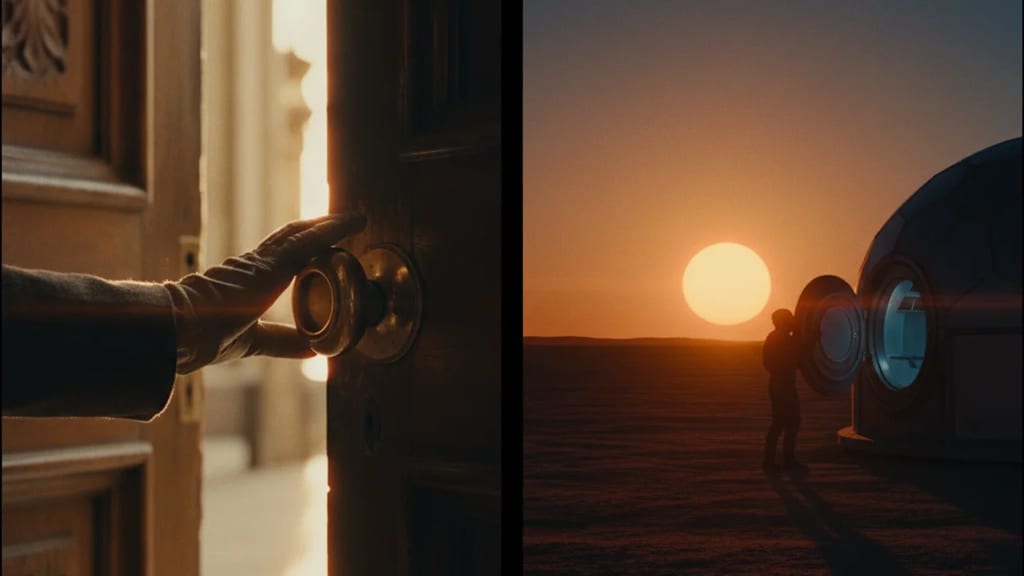
Editing technique that connects two shots through visual similarity – matching shape, movement, color or composition – for elegant, meaningful transitions.
The Match Cut (also Graphic Match, Form Cut, or Match on Action) is an editing technique that seamlessly connects two shots through visual or motion similarity. Unlike continuity-oriented cuts, the Match Cut uses deliberate visual parallels – similar shapes, movements, colors, or compositions – to create thematic or narrative connections.
Two shots are cut when a similar action occurs in both. An arm rises in Shot A and the same or a similar arm rises in Shot B – the cut connects the two.
Workflow in Adobe Premiere Pro:
Shapes and graphic elements match. A circle in Shot A cuts to a similar circle in Shot B. This creates visual coherence and symbolic connections.
Examples:
Similar color palettes connect scenes. A warm-toned scene cuts seamlessly to another warm-toned scene – a visual continuum is created.
DaVinci Resolve Workflow:
Symmetry and image composition align. A central figure in Shot A cuts to a central figure in Shot B – spatial cohesion.
In all modern NLEs:
Premiere Pro:
Final Cut Pro X:
DaVinci Resolve:
Avid Media Composer:
Modern editing tables allow for:
Match cuts connect different locations or times thematically. An interview with a farmer cuts via a match on hand movement to fieldwork. The visual transition becomes invisible, the narrative flows.
In "2001: A Space Odyssey" (1968), Kubrick used a famous match cut: a bone (primitive tool) spins into space and cuts to a spaceship – the evolution of humanity in a single cut.
Match cuts create rhythmic, elegant transitions. Product demonstration: the product's movement in Shot A cuts to the consumer's movement in Shot B – a connection is made.
Match cuts are essential for training montages (Rocky-style): boxing movement cuts to similar movement in a new location – progression is shown elegantly.
Premiere Pro Shortcuts:
I / O: Set In/Out PointsCtrl+Alt+,: Double-click edit at playheadV: Selection Tool (quickly switch between tools)Final Cut Pro:
A: Append edit (quick clip chaining)Ctrl+V: Insert edit with timingDaVinci Shortcuts:
I / O: In/Out PointsX: Ripple DeleteV: Activate Ripple EditMatch Cut habe ich beim Drehen im Kopf. Mein Material muss im Schnitt funktionieren – ich liefere Coverage, die dem Editor Spielraum gibt.
Bei Match Cut entdecke ich den Film, den ich wirklich gedreht habe. Der Schnitt offenbart Stärken und Schwächen und bietet neue kreative Möglichkeiten.
Match Cut ist mein Kernhandwerk. Am Schneidetisch entsteht der Film neu – ich entscheide über Rhythmus, Tempo und emotionalen Fluss der Erzählung.
Match Cut braucht Zeit und erfahrene Editoren. Ich plane ausreichend Schnittzeit ein, denn hier wird aus Rohmaterial ein Film.
1. Was beschreibt „Match Cut" am besten?
2. Zu welchem Department gehört „Match Cut"?
3. Wie viele verschiedene Fachperspektiven bietet dieser Eintrag?
The Lexikon is part of the Filmfarm ecosystem — alongside budgeting (FilmBalance), an industry magazine (FilmCircus) and crew networking (FilmCall, CrewMesh). One shared vocabulary for the whole production.