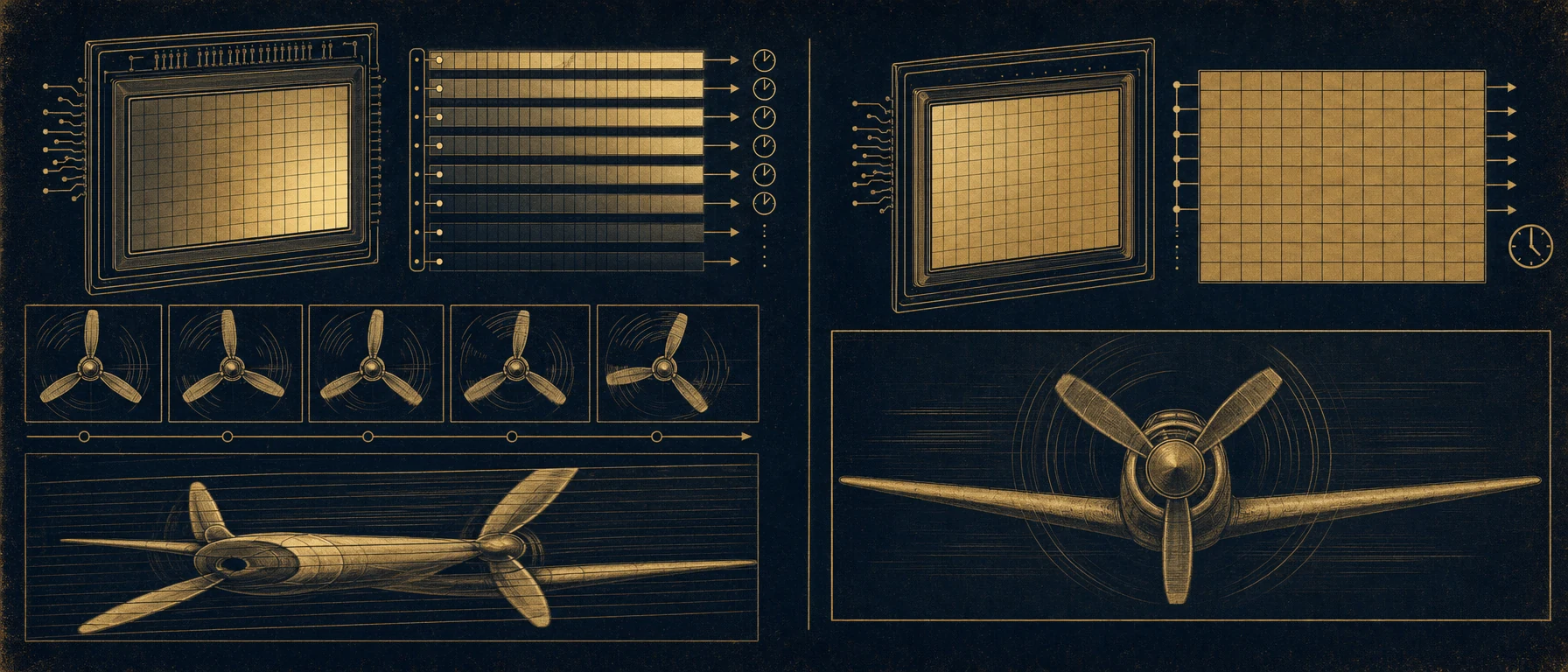
Rolling Shutter is an exposure technique where the sensor is exposed line by line from top to bottom (or sideways), which under certain conditions can cause distortions, jello effects and aliasing.
Definition
Rolling Shutter (German: Rolling Shutter Effect or line scanning) is an exposure method where a digital sensor does not expose all pixels simultaneously, but rather line by line sequentially – typically from top to bottom. This is the standard technique in modern CMOS sensors and is in contrast to Global Shutter, where all pixels are exposed simultaneously.
The exposure duration can range from 0.5 to 50ms at typical frame rates, which leads to visible artifacts with fast movements:
- Jello Effect: Wavy distortion
- Skew/Shear: Tilting of vertical lines
- Aliasing: Moiré patterns with regular structures
Physical Principle
How Rolling Shutter Works
Timeline of a Rolling Shutter exposure (24fps):

Frame Duration: 41.67ms
Number of Lines: 2160 lines (4K)
Time Gain per Line: 41.67ms / 2160 = ~19.3µs

 t=0ms t=10ms t=20ms t=41.67ms
 ↓ ↓ ↓ ↓
Line 1: [████████]
Line 2: [████████]
Line 3: [████████]
...
Line 2160: [████████]

While the last line is being exposed, the first
line already has 40ms of "old" information.
Example with Global Shutter for Comparison
Global Shutter (all lines simultaneously):

t=0ms t=41.67ms
All lines are exposed here will be read out here
[██████████████████████████████████████]
CMOS vs. CCD
- CMOS (standard today): Line-by-line readout, Rolling Shutter
- CCD (older): Global exposure possible, but expensive and outdated
- Global Shutter CMOS (latest technology): Rolling Shutter without artifacts
Technical Specifications
Rolling Shutter in Modern Cameras
| Camera | Sensor | Resolution | Scan Time | Rolling Shutter? |
|---|---|---|---|---|
| ARRI Alexa Mini | Super35 CMOS | 2880x1620 | ~10ms | Yes (minimal) |
| RED Komodo | RED Dragon | 6K | ~15ms | Yes (moderate) |
| Sony FX30 | CMOS Stacked | 4K | ~8ms | Yes (noticeable) |
| Blackmagic URSA Mini Pro | Super35 | 4K | ~8ms | Yes (noticeable) |
| Canon R5 | Full Frame CMOS | 8K | ~22ms | Yes (significant) |
Scan Time Calculation
Scan Time (Number of Lines / Readout Speed):

ARRI Alexa Mini at 24fps:
 Frame Duration = 1000ms / 24fps = 41.67ms
 Number of Lines = 1620
 Effective Scan Time ≈ 10ms (~24% of Frame Duration)

Sony FX30 at 24fps:
 Frame Duration = 41.67ms
 Number of Lines = 2160
 Effective Scan Time ≈ 8ms (~19% of Frame Duration)

RED Komodo at 24fps:
 Frame Duration = 41.67ms
 Number of Lines = 3160 (6K)
 Effective Scan Time ≈ 15ms (~36% of Frame Duration)
Important: Higher Frame Rates = shorter Scan Time = less Rolling Shutter Effect
Sony FX30 at various Frame Rates:

24fps: 41.67ms Frame Duration → ~8ms Scan = Noticeable
60fps: 16.67ms Frame Duration → ~3.2ms Scan = Subtle
120fps: 8.33ms Frame Duration → ~1.6ms Scan = Barely visible
Artifacts and Their Causes
1. Jello Effect (Wobbling)
The classic Jello effect occurs with camera movements perpendicular to the scan direction:
Fast Horizontal Pan:

Top (exposed early): Position A
 (Camera was here)
Middle (exposed later): Position B
 (Camera is here)
Bottom (exposed last): Position C
 (Camera is already here)

Result: Image content appears wavy and distorted
Effect is stronger with:
 - Faster pans
 - Faster frame rates (greater distance traveled)
 - Larger sensors (more spatial resolution)
Visual Example:
- Fast 30° pan at 24fps: VERY visible (5-10° distortion)
- Slow 10° pan at 24fps: Barely visible
2. Skew (Shear)
Vertical or near-vertical lines are tilted with horizontal movement:
Stationary Vertical House:

Global Shutter: Rolling Shutter (fast pan):
 | /
 | (perfectly vertical) / (tilted 1-3°)
 | /
3. Aliasing (Moiré Effects)
Moiré patterns arise with very regular structures and certain movements:
Comparison of Textures:

Facade with regular window patterns:
 Global Shutter: Clean window lines
 Rolling Shutter: Moiré patterns, window lines oscillate

Helicopter Rotors:
 Global Shutter: Normal rotor movement
 Rolling Shutter: Aliasing, rotor appears slowed down or reversed
4. Vertical Line Displacement
With movement, a half-exposed object can occur:
Ball Throw (falling vertically):

Global Shutter: Rolling Shutter:
[O] (clean ball) [O] top
 [O] middle (displaced)
 [O] bottom (highly displaced)
Practical Implications
Motion Speed Thresholds
ARRI Alexa Mini at 24fps:
 Pan Speed | Visibility
 5°/Second | Not visible
 15°/Second | Just visible
 30°/Second | Clearly visible
 60°/Second | Severely disruptive

 Rule of thumb: Below 10°/sec it is invisible
Sony FX30 at 24fps (smaller sensor):
10°/Second | Not visible
25°/Second | Just visible
50°/Second | Clearly visible
Rule of thumb: Below 15°/sec it is invisibleCritical Scenes
Rolling Shutter becomes problematic with:
- Action/Chase Scenes
- Fast camera movements
- Helicopter shots
- Drone footage (especially fast movements)
- Lighting Techniques
- LED panels with high frequency (aliasing)
- Fluorescent lights (50Hz flicker)
- VFX and Tracking
- Marker-based motion capture
- Perspective correction in post
- Fast Object Movements
- Falling objects
- Rotor blades
- Rolling wheels
Rolling Shutter in Practice
Pre-Production
Questions that need to be answered:
- Which camera will be used? (Know the rolling shutter characteristics)
- How fast will the planned camera movements be?
- Are there action sequences that could be problematic?
- Are drones planned? (extreme rolling shutter)
Plan solutions early:
If fast pans are planned:

Option A: Choose a camera with minimal rolling shutter
 → ARRI Alexa 35 (best)
 → RED Komodo (good)
 ✗ Sony FX30 (significant RS)

Option B: Higher Frame Rate
 → Shoot at 60fps instead of 24fps (4x less RS)
 → But: 2.5x more storage, less natural motion look

Option C: Adapt the scene's motion design
 → Gentle movements instead of fast pans
 → Zoom instead of pan (zoom shows no jello)
Shooting
1. Plan Camera Movements:
Scene: Chase through a narrow alley (Action)

Problem: Fast pans are necessary
Solution 1: Higher Frame Rate
 - Shoot at normal 24fps + 60fps for action inserts
 - In post: Stretch 60fps to 24fps (slow-motion look)

Solution 2: Use stabilization
 - Gimbal instead of handheld (smoother movements)
 - Remote Head (very precise, controlled movements)

Solution 3: Dolly shot instead of handheld
 - Smooth, planned movements = less RS
 - DoP gains more control
2. LED Lighting:
Scenario: Studio with modern LED panels

Problem: LEDs without PWM at certain frequencies = flicker + aliasing

Solution:
 ✓ Use High-Frequency PWM LEDs (100+ kHz)
 ✓ Match LED frequency to frame rate
 ✓ Or: At 50Hz frequency, shoot at 50fps (or 100fps)
3. Drone Footage:
DJI Mavic 3 (extreme rolling shutter):

Fast drone movement:
 - Significant jello effect
 - Often unavoidable

Best Practices:
 ✓ Slow, smooth movements
 ✓ Use zoom instead of pan
 ✓ Or: Gimbal-based professional drone (Freefly)
Post-Production
Rolling Shutter Correction in Post:
- Warp Stabilizer / Optical Flow
 Adobe Premiere / After Effects:
 Effects > Distort > Warp Stabilizer

 - Can smooth out slight distortions
 - Only works for moderate effects
- Can lead to new artifacts- Dedicated RS Correction Software
 - ReelSteady (drone footage)
 - Gyroflow Toolbox
- 3D Camera Tracker + Distortion Correction- Roto and Frame-by-Frame Correction
 For extreme cases:
 - Node-based corrections (Nuke, Fusion)
 - However, very time-consuming
 - Not suitable as a standard solution
Rolling Shutter vs. Global Shutter
Direct Comparisons
| Aspect | Rolling Shutter | Global Shutter |
|---|---|---|
| Jello Effect | Yes, with fast movement | No |
| Scan Time | 5-30ms | 0ms (all pixels simultaneously) |
| Price | Cheaper | 30-50% more expensive |
| Sensor Size | Compact possible | Larger sensors needed |
| Light Sensitivity | Better SNR | Slightly worse |
| Availability | Standard | Still rare (2024-2026) |
| Action Suitability | Poor | Excellent |
| Slow Motion | Subtle artifacts | Perfect |
Global Shutter Cameras (2024-2026)
Emerging Technologies:

SONY BURANO (from 2024):
 - Global Shutter (!) - first professional cinema camera
 - But: Extreme heat generation
 - Very expensive

Panasonic LUMIX GH7 (2024):
 - Rolling Shutter, but improved algorithm

Canon EOS R8 (2023):
 - "Electronic Global Shutter" Mode
 - Not true Global Shutter, but an algorithm
Practical Rule of Thumb for Film Production
Rolling Shutter Acceptance Matrix:

┌─────────────────────────────────────────┐
│ Camera Movement / Genre │
├─────────────────────────────────────────┤
│ Drama (slow) → RS acceptable │
│ Thriller (moderate) → RS problematic│
│ Action (fast) → RS unacceptable │
│ Documentary (variable)→ Depends on scene│
│ Slow Motion (60fps+) → RS minimized │
│ Handheld/Found Footage → RS invisible│
│ (fits the aesthetic) │
└─────────────────────────────────────────┘
Special Cases
Drones and Rolling Shutter
Drones have extreme rolling shutter issues:
DJI Mavic 3 (Consumer Drone):
 - Very small sensors
 - Very fast scan time
 - Jello effect with any fast movement
 → Not suitable for film production

Professional Freefly Astro (Professional Drone):
 - Larger sensor
 - Better processing
 - Gimbal stabilizes movements (less effect)
 → Acceptable for film production
Camera Stabilization and Rolling Shutter
Interestingly: In-camera stabilization can worsen RS:
ARRI Alexa Mini with EIS (Electronic Image Stabilization):
 - Camera digitally compensates for movements
 - This can lead to additional distortions
 - Many DoPs consciously disable EIS
Slow Motion and Rolling Shutter
Scene: Ball falling 1 meter (normal slow motion)

24fps global shutter:
 Ball looks smooth, clean movement

120fps rolling shutter:
 - Ball is half exposed (short scan time)
 - RS effect minimal
 - Visually cleaner!

Paradox: Higher frame rates reduced RS,
but 120fps slow motion looks "unnatural"
See Also
- Global Shutter – Alternative to Rolling Shutter
- Shutter Speed – Exposure duration
- Frame Rate – Frames per second
- Motion Blur – Motion blur
- ARRI Alexa – Rolling Shutter Characteristics
- RED Komodo – Rolling Shutter Analysis